Anatomy of an Agentic Workload
Anatomy of an Agentic Workload
The previous article explored when an agent makes sense. It reduced an agent to a loop: a model, a set of tools, and a condition that tells it when to stop. The interesting part was the ability to decide what to do next based on the result of the previous step.
But what actually happens when that loop runs, and which parts of the infrastructure are involved?
This article establishes the terminology used throughout the series. It explains triggers, harnesses, tools, skills, execution environments, and the model itself. Understanding how these components interact provides the foundation for examining how agentic workloads differ from human chat, and what those differences mean for GPU compute, memory consumption, scheduling, and cache locality.
From answering questions to executing tasks
A typical chatbot interaction starts when a person submits a prompt. The inference server processes the input tokens, generates output tokens, and completes the request. The person reads the answer and decides what to ask next. The conversation may remain open, but the model is not continuously executing on behalf of that conversation.
Consider the bicycle example from the previous article: “Should I bike to Amsterdam tomorrow?” The chatbot cannot check the calendar, route, or weather forecast without access to tools. Instead, it asks for more information. The person checks the relevant details, submits another message, and repeats the process until there is enough information to make a recommendation.
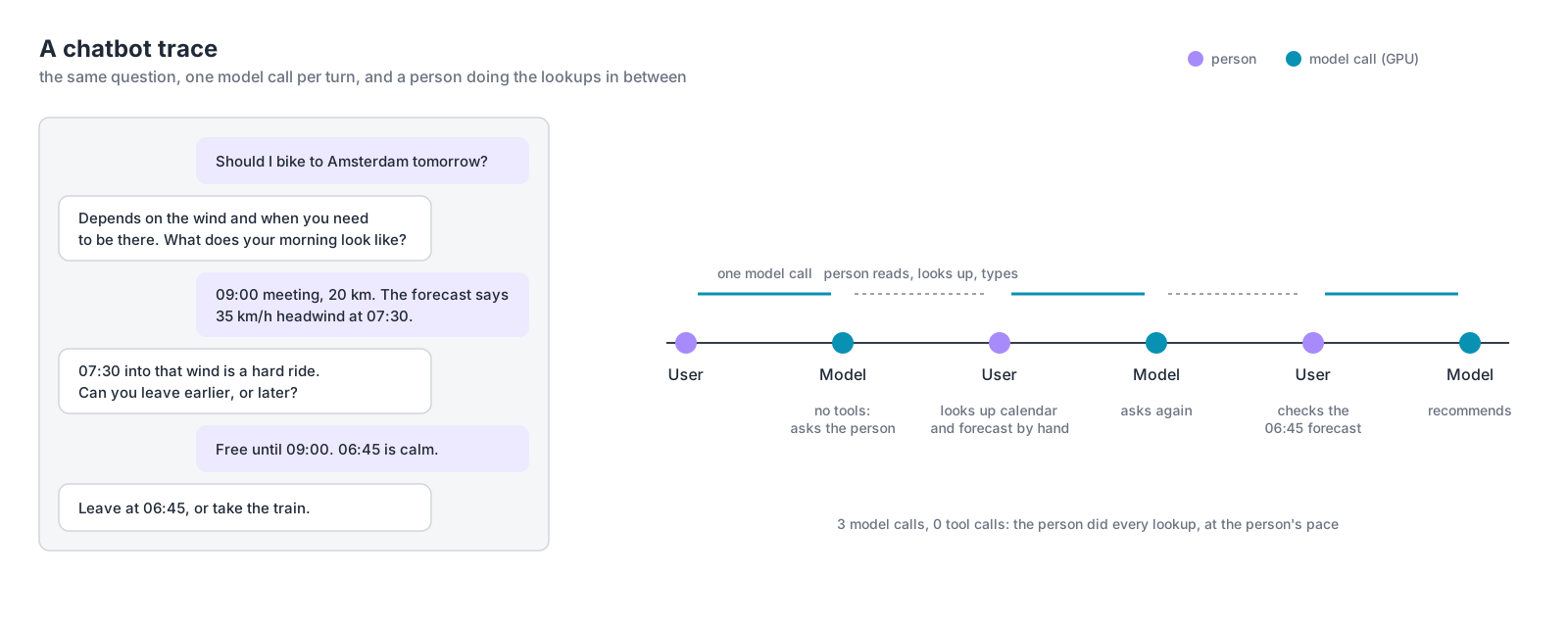
The diagram shows three model calls. Between those calls, the person checks the calendar, looks up the forecast, and provides the missing information manually. Each model request finishes before the next user message arrives. The pace of the conversation is determined by human interaction, not by the model.
Now consider the same question handled by an agent. Instead of asking the person to collect the missing information, the model can request actions through tools. The surrounding software executes those actions, collects the results, and sends them back to the model. The model uses that information to determine what to investigate next.
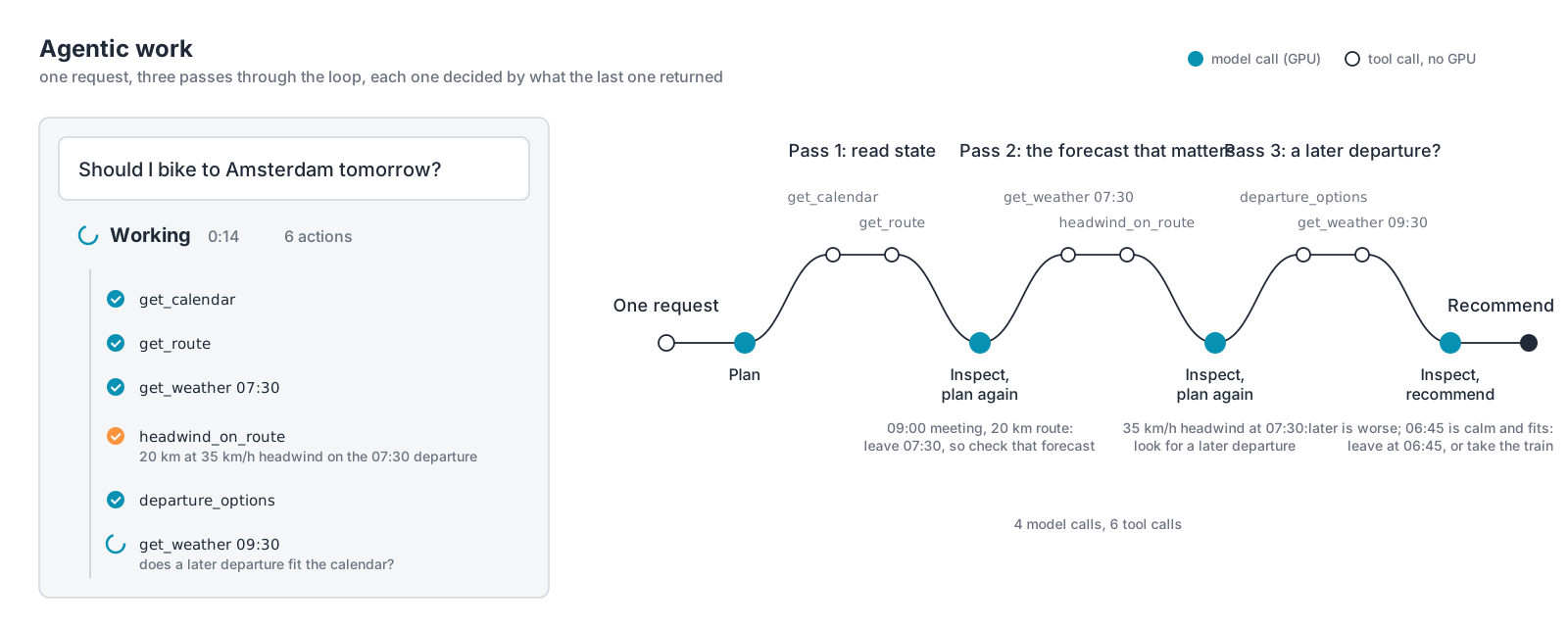
The agent starts by checking the calendar and route. A 09:00 meeting and a 20-kilometer journey establish the relevant departure time. The next step is to retrieve the weather forecast and evaluate the headwind along the route. When the result shows a 35 km/h headwind at 07:30, the agent investigates alternative departure times. A later departure turns out to be worse, while leaving at 06:45 provides better conditions and still fits the calendar.
The diagram shows four model calls and six tool calls, all initiated by a single user request. The model determines which information is needed, the tools retrieve or process that information, and the results influence the next step. The person no longer needs to perform the intermediate lookups. The important difference is not simply the number of model calls. The initial request starts a workflow that can continue without further human interaction. The next model request is triggered by the completion of a tool operation rather than by someone reading an answer and typing another question.
That distinction becomes interesting when looking at the infrastructure involved. Each model call requires inference, typically executed on GPUs. Checking the calendar, retrieving weather data, calculating the headwind along the route, and evaluating departure options are tool operations, generally executed using CPU resources or external services. An agent harness coordinates these activities and maintains the execution state (more about agent harnesses in the next section).
The GPU is not continuously busy throughout the agent run. Once a model call finishes, the agent harness may spend time executing tools or waiting for their results. During that interval, the inference server can process requests from other applications or agents. When the tool results arrive, the agent harness constructs another model request and execution continues.
There is another characteristic visible in the agent trace. Each subsequent model request needs enough context to continue the task. That can include the original question, instructions, previous model responses, and tool results. Some information is new, but much of the input may have already been processed during earlier model calls.
These execution patterns introduce three characteristics relevant to inference infrastructure. A single task can generate multiple model requests. Tool execution creates intervals between those requests, resulting in bursts of GPU demand rather than continuous execution. And repeated context creates opportunities to reuse previously computed inference state.
The following articles will examine the consequences for inference capacity, scheduling, and cache reuse. First, it is necessary to understand the components responsible for executing the agent workflow.
Anatomy of an agent
Consider an AI infrastructure Kubernetes operation. An administrator wants to upgrade the GPU driver on a Kubernetes worker node and asks: “Can I drain gpu-node-07 now?”
This looks like a simple yes-or-no question, but the answer depends on several systems. The node may be running inference replicas with active requests and cached context. A training job might span multiple nodes connected through a high-speed network. Other nodes might have free GPUs, but not enough capacity within the required NVLink topology.
The agent needs to collect information before recommending an action. Available GPU memory alone does not establish whether the node can safely be drained. The next check depends on what the previous check revealed, exactly the kind of problem discussed in the previous article.
The trigger
One thing many articles and presentations seem to omit is the question what actually triggers an agent? Something has to start the agent. That might be a person entering a command, a monitoring alert, a scheduled maintenance workflow, or another agent delegating part of its work.
A person can start the drain agent directly through a CLI command, a Slack integration, or a button in an operations portal. There is also a less direct path. Imagine an administrator talking to a general-purpose infrastructure assistant. The administrator asks whether gpu-node-07 can be drained. The assistant has several tools available, including a specialized drain agent. The model selects that capability and returns a tool call requesting its execution.
The assistant’s agent harness receives the tool call and starts the drain agent. The model does not independently discover arbitrary agents running somewhere in the infrastructure. The available capabilities have to be registered or exposed through the surrounding software.
The same drain agent could be invoked by a Kubernetes controller or a scheduled maintenance workflow. In all cases, the agent receives a task. What differs is the system responsible for starting it. A scheduled maintenance workflow could start one hundred agents at 02:00 without a single administrator being logged in. The number of agent runs is no longer necessarily connected to the number of people using the platform.
The agent and its harness
The agent describes the task and the capabilities available to perform it. Typically, an agent configuration contains a system prompt, a set of tools, optional skills, and a reference to the model it should use. But a configuration does not execute anything. That is the responsibility of the agent harness.
The agent harness is the program that runs the agent loop. It assembles the model request, sends it to the inference endpoint, receives the response, and executes any requested tools. Tool results are added to the context before the next model call. The process continues until the model produces a final answer, an execution limit is reached, or another stopping condition applies. The simplest harness can be expressed in a few lines of pseudocode:
while True:
    response = model(context)

    if response.tool_calls:
        results = execute_tools(response.tool_calls)
        context.extend(results)
    else:
        return response
A production agent harness also handles errors, tool-call arguments, context management, execution limits, permissions, and other operational concerns. But the underlying mechanism remains recognizable.
Several frameworks and applications provide this functionality. LangGraph offers a graph-based runtime for stateful agent execution. LangChain provides agent abstractions built on LangGraph. The OpenAI Agents SDK and Claude Agent SDK provide their own agent loops, tool integration, and execution controls.
OpenClaw and Hermes are also examples of agent harnesses, although they are packaged more as complete agent environments than as libraries for building workflows. They combine the agent loop with capabilities such as persistent sessions, tool execution, and integrations with communication channels. They can run as long-lived services, allowing agents to respond to messages and events without requiring a developer to start a new process for each task.
Organizations can use these frameworks, extend them, or build their own harness. A Python application that maintains context, calls a model, executes tools, and evaluates stopping conditions already implements the essential behavior.
From an infrastructure perspective, the harness is application software. It runs on a conventional operating system, manages state, makes API calls, and waits for responses. It does not execute the model’s transformer computations itself. A developer tool might run the harness on a laptop. An enterprise service might run it inside a Kubernetes deployment. A larger platform might operate many harness workers concurrently.
The harness consumes CPU, memory, and network resources. Depending on the implementation, it may also require persistent storage for execution state and logs. It does not require a GPU simply to orchestrate the agent. The GPU-intensive work happens when the harness sends a request to the model.
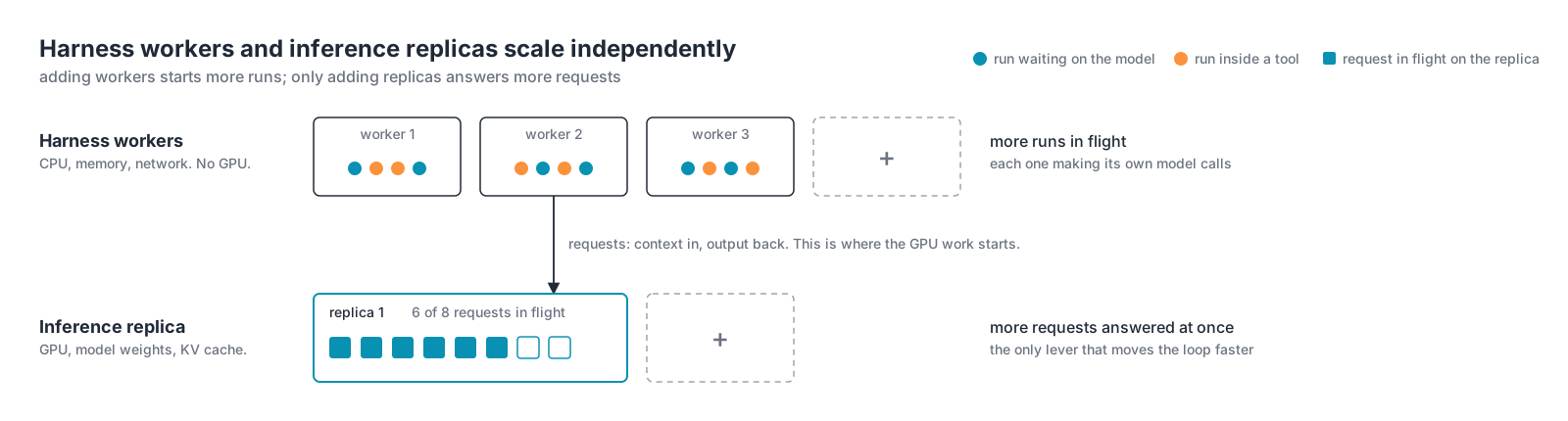
This separation matters operationally. Agent harness workers can scale independently of inference replicas. Adding agent harness capacity allows more agent runs to execute, but it does not automatically increase the inference capacity available to them.
The tools
The model cannot inspect the state of a Kubernetes cluster by itself. It needs a way to retrieve that information. That is where tools come in. A tool is a function or service that performs a defined operation and returns a result. For the drain agent, examples include get_node_workloads(node), get_training_job_topology(job), get_available_gpu_capacity(cluster), get_inference_replica_state(node), and get_node_health(node). The model decides which tool to call. The harness executes it and returns the result.
There is another reason to use tools beyond accessing external systems. LLMs are reasoning engines, not calculators.
Suppose the task is to determine whether a host is overloaded. One approach would be to retrieve thousands of CPU utilization samples, send the entire array to the model, and ask it to calculate the average and the 95th percentile. But why do that? A small Python function can perform those calculations quickly and deterministically. Instead of sending thousands of samples, the tool returns the relevant metrics:
{
  "host": "gpu-node-07",
  "cpu_average_15m": 74.2,
  "cpu_p95_15m": 93.1,
  "threshold_exceeded": true
}
The model uses that information to decide whether CPU pressure matters to the investigation and what it should check next. Python performed the calculation. The model reasons about the result.
Tools can be implemented in two places. The simplest is a function in the agent harness’s own code, as in the examples above. The other is a Model Context Protocol (MCP) server: a separate process or service that exposes tools over a standard interface, so that one tool implementation can serve any harness that speaks the protocol. A local MCP server runs as a child process of the agent harness. A remote one is an HTTP service, which makes it a workload in its own right: something to deploy, secure, and version, and something many agents can share, the same way they share the model endpoint. A single Kubernetes MCP server could serve the drain agent, a capacity-report agent, and an administrator’s general assistant at once.
Two things follow for infrastructure. When a tool runs on an MCP server, that server’s credentials and network reach define what the tool can do; the boundary has moved from the harness’s sandbox to the server. And every tool, local or MCP, contributes its definition to the model’s context on every request: name, description, and argument schema. Connect ten MCP servers with a dozen tools each and the model reads all of those definitions before it reads the task. The measurement later in this article shows what that costs.
This mirrors an observation from an ITQ hackathon. Several teams were building applications that used sensor data. Initially, they sent raw sensor readings directly to an LLM and asked it to interpret the measurements. The results were inconsistent. LLMs are reasoning engines, not calculators. The teams eventually introduced a small machine learning model to process the sensor stream. Instead of asking the LLM to work through the raw measurements, they exposed the ML model through a tool and passed its output to the LLM.
That changed the division of responsibility. The specialized ML model processed the sensor data. The LLM interpreted the outcome and decided what to do next. A Python calculation can provide a deterministic result, while a trained ML model produces a prediction or classification that may still have uncertainty. But the architectural principle is the same: use specialized software to process data, and use the LLM to decide how the resulting information affects the task.
This also reduces the amount of context sent to the model. Instead of thousands of raw measurements, the model receives a compact result. Tool execution introduces another important behavior: while a tool runs, the harness may be waiting for an API response, a command, or another service. During that period, the agent does not necessarily have an active inference request. The GPU can serve other requests while the harness waits.
The system prompt
The system prompt defines the agent’s role, scope, and intended behavior. For the drain agent, it might look like this:
You plan node drains for GPU clusters.

The user names a node. Determine whether it can be
 drained now. If it cannot, explain why and list
 the available options.

Retrieve workload, capacity, topology, and health
information through the available tools.

Do not estimate infrastructure state.

When a workload spans multiple nodes, inspect the
relevant nodes before making a recommendation.

Recommend an action, but leave the decision to the user.

Do not terminate workloads or perform disruptive
actions without explicit authorization.

Stop when you can provide a supported go/no-go
recommendation, or after 20 tool calls.
Notice what the prompt does not contain. It does not describe every possible Kubernetes scheduling constraint, every GPU topology, or every procedure for relocating a training job. Those details belong in tools and domain-specific knowledge available to the agent. The prompt tells the agent what it is responsible for and how it should behave. It does not need to become an operations manual.
There is also an important security distinction. A prompt can instruct the model not to terminate production workloads, but that instruction is not a security control. If an agent must not terminate workloads, the execution environment should enforce that restriction through permissions, credentials, approval gates, and tool access. The prompt communicates the intended behavior. The infrastructure determines which actions are actually possible.
Skills
A skill provides additional knowledge or procedures that the agent can use for a particular task. The system prompt defines the agent’s responsibility, while a skill explains how to handle a specific situation within that responsibility.
For example, the drain agent might have access to a skill called gpu-node-drain:
---
name: gpu-node-drain
description: Use when asked whether a GPU node can be drained, cordoned, or taken out of service for maintenance. Covers training jobs, inference replicas, and scheduled work on the node.
---

# GPU node drain

Work through every section that applies. A section applies when the
tool results show the node hosts that kind of work. Verdicts come from
tool results, never from estimates.

## 1. What is on the node

Call `get_pods_on_node(node)` and `get_node_health(node)`.
Classify each pod as training, inference, or other. If the node is
already unhealthy, say so: a failing node changes the cost of waiting.

## 2. Training jobs

For each distributed training job on the node:

1. Identify every node the job spans. `get_job_checkpoint_state(job)`
   returns the member list with the checkpoint state.
2. Check whether the job checkpoints, when it last did, and when the
   next checkpoint is due.
3. Check replacement capacity for the whole job, not for this node's
   share: `get_cluster_capacity(gpu_type, count, topology)`.
4. Confirm the replacement GPUs sit in one NVLink domain and on the
   fabric the job requires.

Free GPU count is not evidence that a job can be rescheduled. Eight
free GPUs spread over four nodes do not replace one node of eight.

A job that cannot checkpoint, or has no replacement capacity, is a
blocker. A job whose next checkpoint lands inside the maintenance
window is preparation: wait for it.

## 3. Inference replicas

For each replica on the node:

1. Get in-flight requests and cached context:
   `get_replica_cache_state(replica)`.
2. Check whether the router can stop sending new work to it.
3. Determine whether the in-flight requests can finish on their own.
4. Check replacement capacity for the replica: `get_cluster_capacity`.

Cached context is lost when the replica stops. Traffic that depends on
it pays full prefill elsewhere. Report that as a cost, not a blocker.

## 4. Scheduled work

Call `get_scheduled_jobs(node, window)`. A reservation or queued job
that lands on this node during the window is preparation: move it, or
shrink the window.

## Verdict

Return exactly one of:

- Safe to drain
- Drain possible after preparation
- Drain blocked

List the reasons. For preparation, list each step and who performs it.
The skill does not execute these steps itself. It provides instructions that the model can use to determine which tools to call and how to interpret the results. A skill can also include reference material, scripts, or other resources, depending on the agent harness implementation. Some agent harnesses load the full skill only when needed, while keeping a smaller description available so the model can decide when to use it.
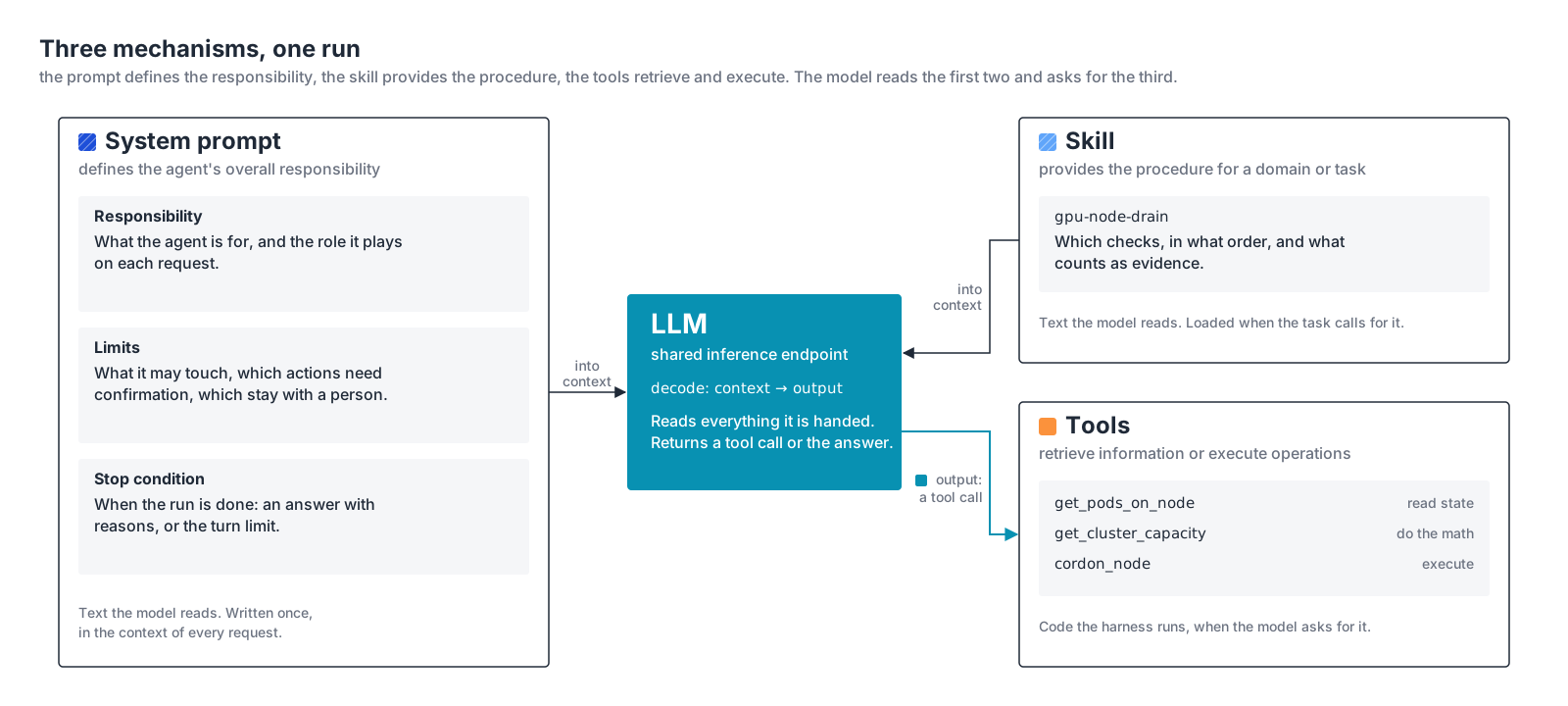
The distinction is useful. The system prompt defines the agent’s overall responsibility. The skill provides procedures for a particular domain or task. Tools retrieve information or execute operations. These are three different mechanisms, even though they work together during the same agent run.
The sandbox
Tools sometimes need to execute commands, read files, or access infrastructure APIs. Those operations need an execution environment. For a developer running an agent locally, that is the developer’s own shell: no boundary at all, which is the weakest form. For an enterprise deployment it is a container, pod, microVM, or VM with restricted access to the surrounding environment. This is commonly referred to as the sandbox.
The sandbox defines what tool execution can reach. For the drain agent, that might be read access to the Kubernetes API, the job controller, and the inference router, and nothing else. It should not inherit the harness host’s permissions, and it should not reach every cluster or production system by default. Network policies, service accounts, filesystem restrictions, and short-lived credentials set the scope.
The reason this matters more for an agent than for any other service is in the loop itself. The model’s output is executed, and every tool result flows back into the context the model reads next. A file, a ticket, or a web page that a tool reads can carry instructions, and the model has no way to tell those apart from yours. The prompt tells the model what it may do; the sandbox is where that limit holds when the model has been talked into something. The Hugging Face intrusion in section 2 is the case to keep in mind: the agent’s permitted egress path was the hole.
Credentials are the clearest case. The tools need to authenticate to the Kubernetes API, the job controller, and the router, with an API key or a service account. The credentials belong in the sandbox: the tool code reads them from a mounted secret or an environment variable and attaches them to the call. The model never sees them. It produces the text get_pods_on_node("gpu-node-07") and nothing more; how that call was authenticated is the sandbox’s business. That keeps the credentials out of the trace logs, out of every request to the model endpoint, and out of reach of anything a tool reads into the context. Because the sandbox exists per run, the credentials can be issued per run as well: read-only, valid for minutes, revoked when the sandbox is destroyed.
Lifecycle and scale are the operational half. The common enterprise pattern is one ephemeral environment per run: created at the first tool call, holding the run’s working files, destroyed at the verdict. The context belongs to the harness; the working directory belongs to the sandbox. Two consequences follow from the numbers earlier in this article. The two hundred runs that start at 02:00 are two hundred sandboxes. And a cold start for a pod or microVM lands inside the tool-execution gap, the 5.2 seconds at the median in the trace, which is why warm pools of sandboxes exist.
One more boundary is easy to miss. Whatever a tool reads goes into the context, and the context goes to the model on every call. If the model is a hosted endpoint, that is data leaving your environment. The sandbox’s read scope therefore doubles as the data-egress policy: anything it can read, the model provider can receive. Scope the sandbox to what the task needs, and have tools return the fields the verdict needs rather than whole objects.
Not every tool executes inside the harness’s environment. Some run on MCP servers elsewhere, as described above. The boundary then sits on that server, and its permissions are the ones that count. What matters is knowing where each operation executes and which permissions apply at that point.
Infrastructure consequence: sandboxes are workloads to place, secure, and manage, and they scale with runs the way harness workers do. Their startup time is part of tool latency. None of them need a GPU unless the tool itself runs a model.
The LLM
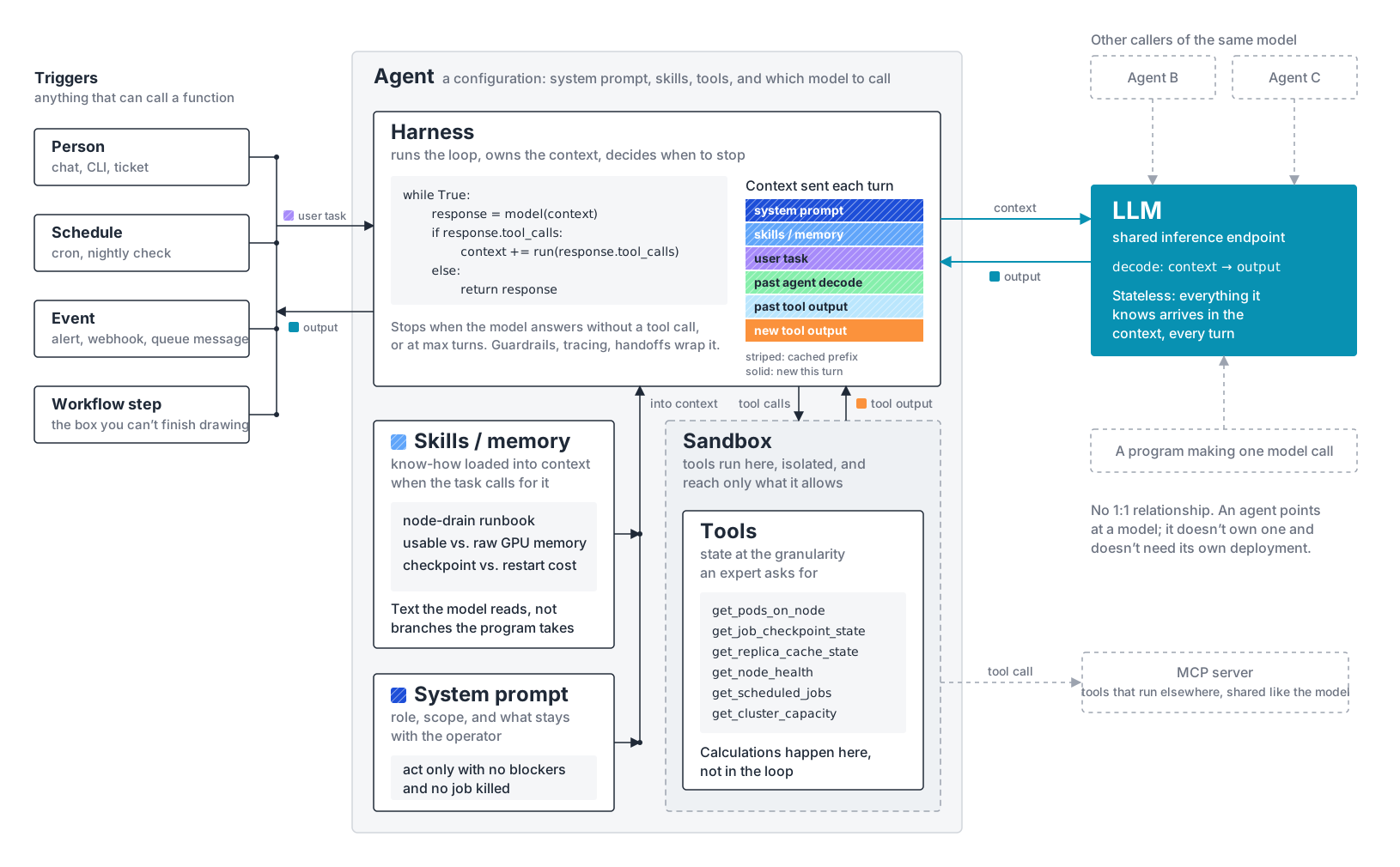
Please, look again at the agent anatomy diagram. The model is deliberately drawn outside the agent.
An agent does not need its own model deployment. The agent harness sends requests to an inference endpoint. That endpoint might consist of a single model server or several replicas behind a router. Other agents, applications, and ordinary programs can use the same endpoint.
The inference service does not need to know that a request belongs to a drain agent. It receives input tokens and generates output tokens, potentially including a request to call a tool. The agent harness interprets that output and decides how execution continues.
The model also does not own the agent’s conversation history. The agent harness maintains the execution context and supplies the information required for each model call. The inference runtime may retain previously computed state, such as KV cache entries, but that is different from maintaining the agent’s workflow.
The system has two distinct parts: the agent harness manages agent execution, while the inference platform processes model requests. Both can scale independently, but they are connected through the requests generated by the agent loop.
Anatomy of an agent request
The first half took the agent apart, using the drain agent to name the parts. This half takes apart what those parts produce: the requests that arrive at the inference endpoint. For that we need measured runs, so the example changes to the agentic workloads that have public published traces, which are coding agents. Seen from the inference endpoint, each component answers one question about the requests. The trigger decides how many runs start and when. The harness decides how many requests a run makes. The tools decide when the next one can be sent. The system prompt, the tool definitions, and the skill decide what every request begins with. The sandbox adds time, not tokens. The model receives the sum. The subsections below take them in that order.
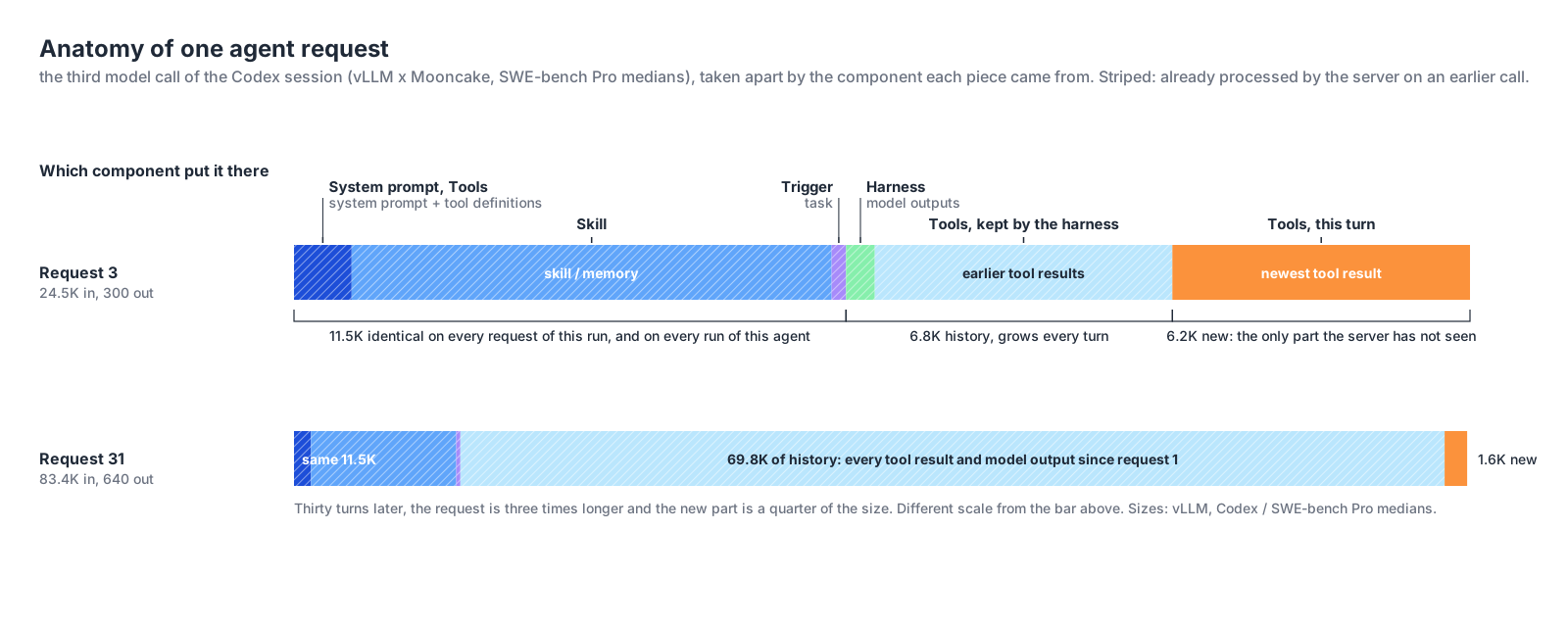
The numbers come from two analyses by the vLLM team. The first is vLLM x AgentX, a serving study of the AgentX benchmark. The second is vLLM x Mooncake, which analyzed 610 sessions of OpenAI’s Codex coding agent working through SWE-bench Pro, a benchmark of real software-engineering tasks, and published per-turn medians for one representative session: how large each request was, where its tokens came from, and how long the agent waited between requests. That session is detailed enough to take one request apart.
The trigger decides how many runs start, and when
Look at where the trigger’s contribution sits in the figure. It supplies the task, a few dozen tokens, and the task is fourth in the request, behind the system prompt, the tool definitions, and the skill. The thing that started the run is not the thing the model reads first.
Two reasons, and both are the harness’s doing. The model reads a request front to back, so the harness puts the instructions and the available tools before the thing they apply to, the way a function’s signature comes before its arguments. And the harness puts everything that never changes first, deliberately. An inference server can reuse the work it did on a request’s opening tokens only up to the first token that differs from what it processed before, so a fixed prefix followed by the variable task keeps that reusable stretch as long as possible. What the server does with it is the next article.
What the trigger does decide is when runs start and how many start together. Neither dataset has a person at a keyboard. The 610 Codex sessions were started by the benchmark runner, one per task, in batches; the AgentX sessions the same way. That is the software-triggered case from the trigger section in its purest form: the runner decides how many runs start and how close together, and the inference endpoint sees every run’s first request arrive within seconds of the others. A person starting one session from a terminal produces one run at a time; a runner, a scheduler, or an alert produces as many as it is told to.
The harness decides how many requests each run makes
Each pass through the loop is one request. The AgentX analysis reported a median of 43 model turns per session; the Codex analysis a median of 33. One task is no longer one request followed by a human pause. It is a sequence of dozens.
A run can also fan out, and there are two ways to do it that look alike and are not. The first is parallel tool calls: the model returns several tool calls in one output, the harness runs them at the same time, and all the results land in the same context. That is one model request and a longer gap. The second is a subagent: a tool call that tells the harness to start another loop, with its own context, its own model calls, and its own result handed back to the parent when it finishes. That is more requests, and they overlap with the parent’s. In the AgentX data, 44% of sessions started at least one subagent, with a median of four in those sessions.
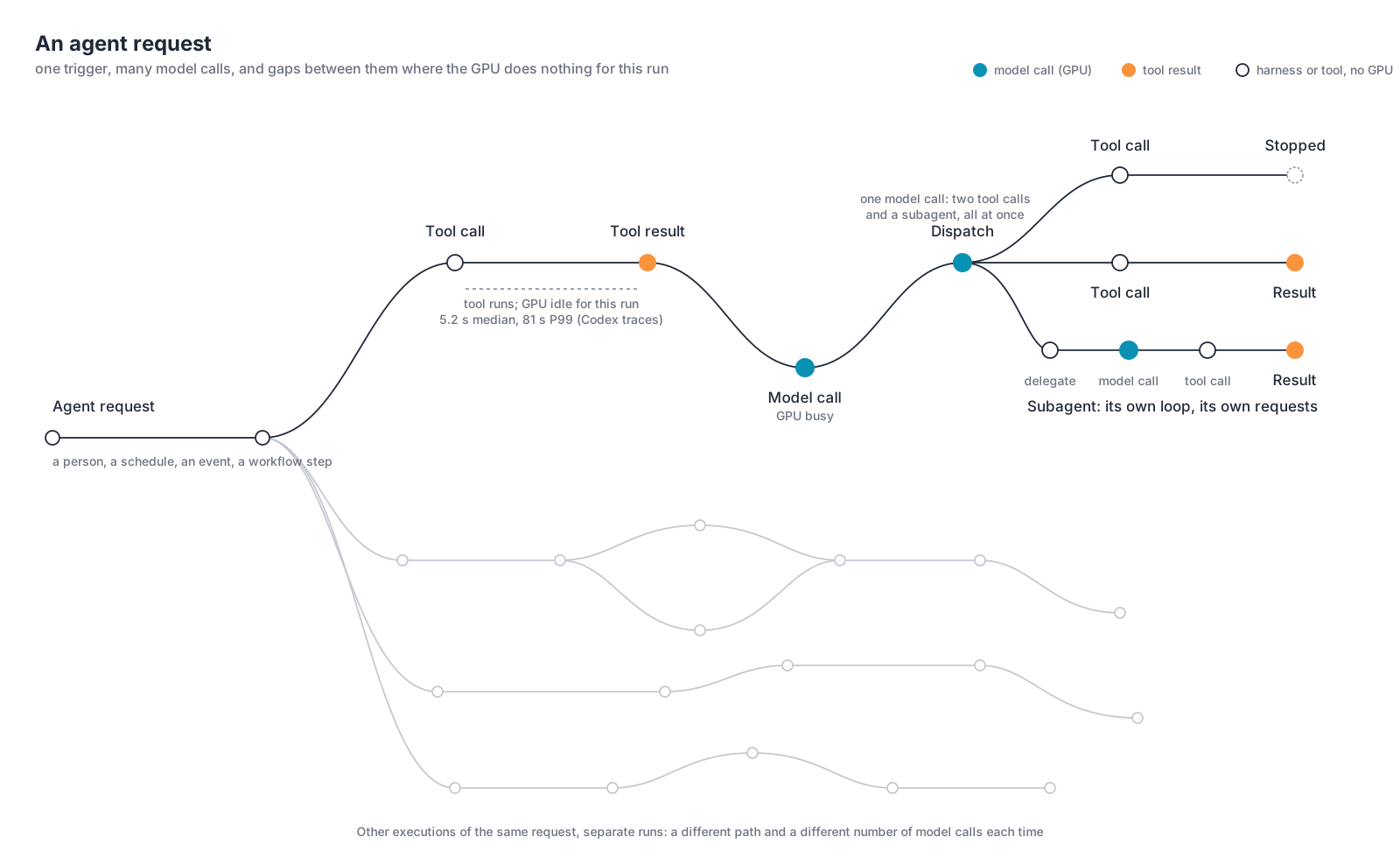
Other runs of the same task take other paths. Some finish after a few model calls; some need dozens; some fan out. How many requests a run will make is decided during the run.
Tool latency is an inference capacity question
The model endpoint spends GPU compute and GPU memory on a request only while it is processing it: from the moment the agent harness sends the context to the moment the last output token comes back. A session that is waiting for a tool result costs the GPU nothing, except the memory it may still hold for that session’s prefix in its KV cache.
This is a good moment to compare CPU and GPU behavior, because the habits from one do not carry to the other. On a CPU, a worker thread in a conventional request-serving application that is blocked on I/O still occupies its slot in the thread pool, with its stack and its open connection, until the read returns. The core is free, but the slot is not, and the slots are the server’s capacity: fill the pool with threads waiting on slow I/O and the application stops accepting requests while its cores sit idle. On the GPU, a session waiting on a tool occupies no slot at all: the request is finished. The model endpoint returns the tool call, frees the request’s slot, and processes other sessions’ requests until the next one arrives. A hundred sessions waiting on slow tools leave the GPU free for a hundred others. GPU capacity is spent only on the requests being processed at that moment and the KV-cache memory they need.
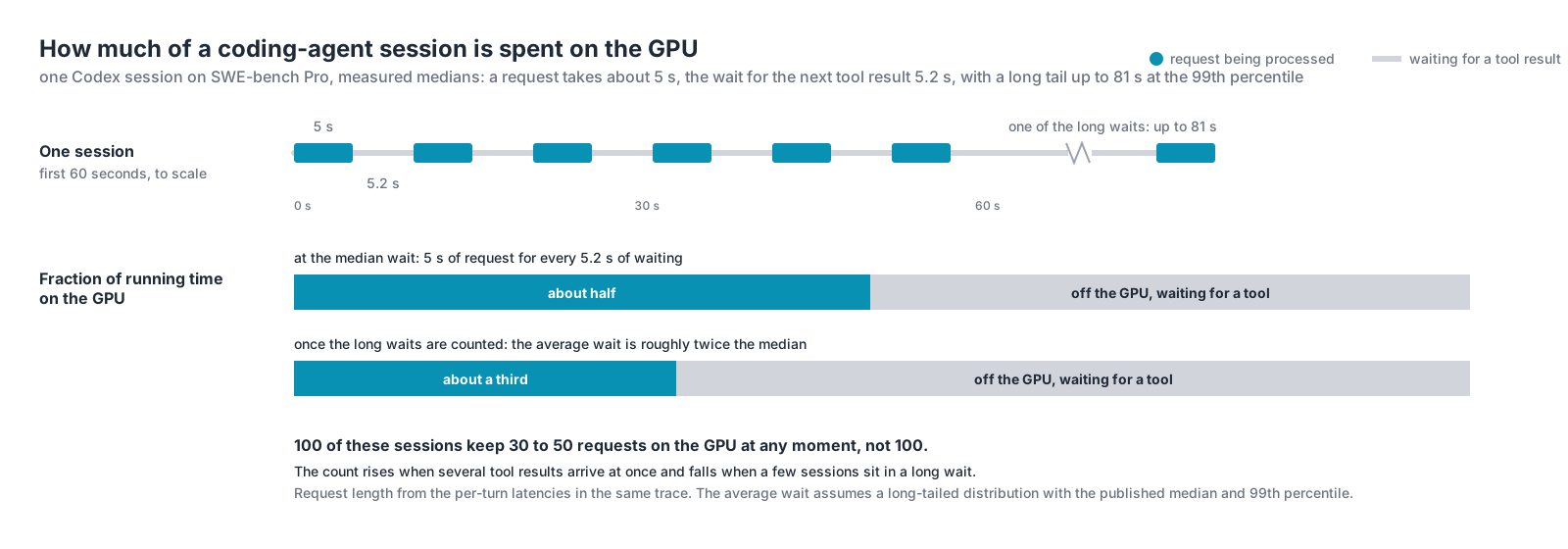
A session’s next request arrives when its tool returns. The time between two requests is tool latency, so for a given number of sessions, the tools decide how many requests are on the GPU at once. Faster tools make shorter sessions that keep more requests on the GPU; slower tools make longer sessions that keep fewer there.
The OpenAI Codex analysis measured both halves of that cycle across its 610 sessions: a request takes roughly 3 to 10 seconds to process after the first, and the wait for the tool result that follows has a median of 5.2 seconds and a 99th percentile of 81.4 seconds. With a 5-second request followed by a 5.2-second wait, a session has a request on the GPU about half of its running time. The long waits lower that fraction: once the tail is included, about a third.
Three consequences follow for the platform.
The first is capacity. The number of requests on the GPU at once is the number of sessions times the request time, divided by the request time plus the tool latency. One hundred of these sessions keep thirty to fifty requests on the GPU at any moment, so a model endpoint sized for one hundred concurrent requests, which is what counting sessions suggests, is two to three times larger than the load it will see. Halve the tool latency and the same hundred sessions add a third to that load; double it and they remove a third. Only when the wait is far longer than the request does halving it come close to doubling the load.
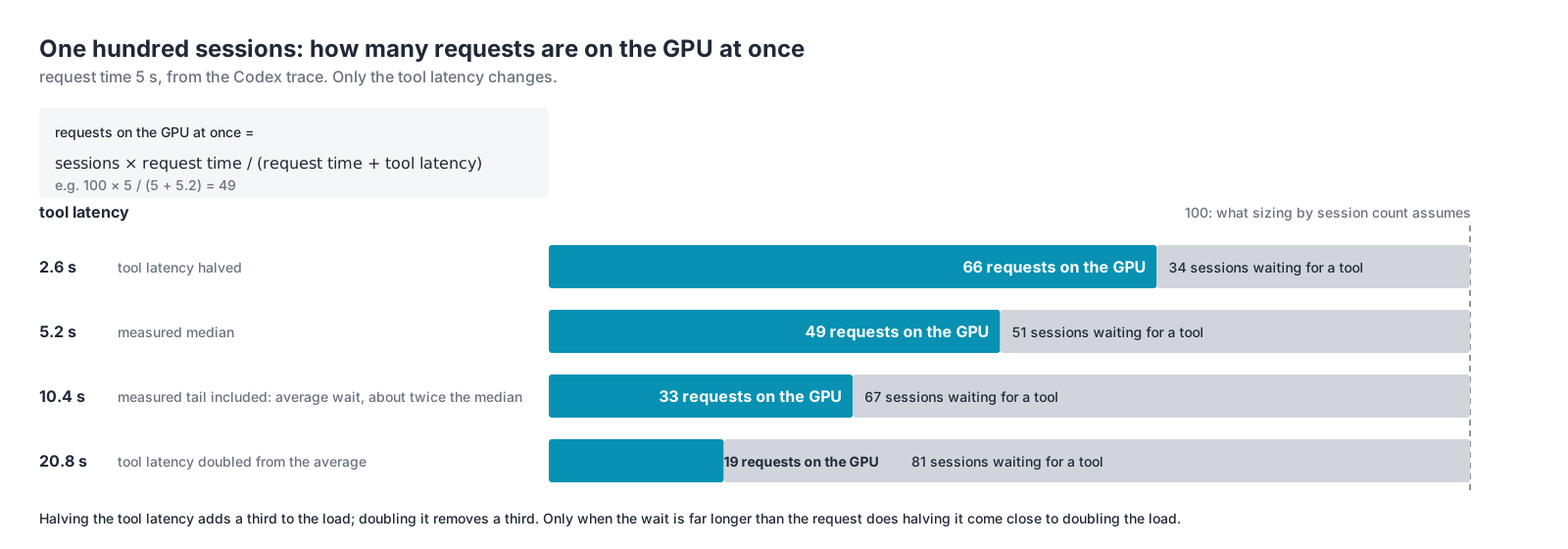
The second is the shape of that load. The waits are not synchronized, so the count is never steady: it rises when several tool results arrive within the same second and falls when a few sessions are sitting in an 80-second wait. The model endpoint has to be sized for the peaks of that count, not its average, and the peaks arrive without warning.
The third is the KV cache. The model endpoint keeps a session’s prefix in GPU memory until it needs that memory for other requests. A 5-second wait is short enough that the prefix is usually still there when the next request arrives; an 80-second wait, under load, is long enough that it has usually been evicted, and that session’s next request pays to recompute all of it, which is the expensive part of every request. The tail of the wait distribution is therefore also the tail of the request-cost distribution: the sessions that come back latest come back most expensive.
The platform underneath the tools sets the GPU’s efficiency
Sandbox startup, storage latency, and CPU headroom are GPU efficiency levers. That sounds backwards, so here is the chain.
Tool latency is both the amount of inference demand and the cost per unit of it. The demand half is the arithmetic above. The cost half is the KV cache: a session whose next request arrives while its prefix is still in GPU memory pays only for the new tokens, and a session whose next request arrives after the prefix was evicted pays to recompute the whole thing, 11.5K tokens in the Codex session and over 20K in the Claude Code measurement, before it produces a single token of output. Every request that misses the cache costs the GPU several times the compute of one that hits, so the hit rate decides how many requests a GPU can process per second, and the wait decides the hit rate.
Three parts of the platform set the wait. How fast a sandbox starts: a container or microVM that takes seconds to come up adds those seconds to the first wait of every session, and to every wait if sandboxes are created per tool call. How fast the tools’ data arrives: a tool that reads logs, metrics, or files from storage with poor read latency, or over a congested network, waits for every byte before it can return. How fast the tools compute: a harness host or sandbox with CPU to spare finishes the calculation and returns; one that is oversubscribed queues it. Shorten any of the three and the next request arrives sooner, the prefix is more likely to still be in the cache, the request costs less GPU compute, and the same GPUs complete more requests per second. Lengthen any of them and the reverse happens on every session at once.
None of those three is a GPU, and none of them appears in a sizing exercise that counts sessions. Sandbox startup time, storage read latency, and CPU headroom on the tool side are usually treated as the agent application’s concern, or nobody’s. They are the inference platform’s concern. They decide how much of the GPU’s time is spent re-reading what it already read, and that is the largest lever on inference cost and throughput that sits outside the GPU itself.
Closing
An agent is not a model with a different name. It is a software system that coordinates model calls, tools, and execution state to complete a task.
The trigger starts the run. The agent harness manages the loop. The system prompt defines the agent’s responsibility. Skills provide domain-specific procedures. Tools retrieve information and execute operations. The sandbox and surrounding infrastructure enforce execution boundaries. The model is a shared inference service that the harness calls when reasoning is required, and what it sees is the sum of all of them.
The AgentX serving data shows what that sum looks like for one kind of agent, a coding agent, when the chain works. The median request carried 142K input tokens and produced 444 output tokens; the Codex analysis reported an average input-to-output ratio of about 131:1. Long input, short output, and almost all of the input already seen: the AgentX workload recorded prefix-cache hits above 96%, so nineteen requests in twenty paid only for their new tokens.
Those numbers belong to coding agent’s. Other types of agents read different amounts into the context and wait on different tools, so their request sizes, waits, and cache hit rates will differ. The structure does not: a fixed prefix, a growing history, a thin slice of new input, and a wait between requests set by the tools. The proportions are the workload’s own, and they have to be measured before a platform is sized.
Seen from the model endpoint, the components set three quantities, and they are not the same number:
- Active agent runs: how many tasks the agent harnesses are executing. Set by the trigger.
- Inference request rate: how often those harnesses submit a request. Set by the harness and the tools.
- Requests on the GPU at once: how many requests the model endpoint is processing at one moment. Set by the request time against the tool latency.
One hundred active agents do not mean one hundred requests on the GPU. The number is smaller while agents wait for tools, larger when work is delegated and runs in parallel, and it moves with the latency of the systems behind the tools. That is the first change agentic workloads introduce: inference demand is shaped by software execution rather than by human interaction.
None of the three quantities is GPU demand yet. Two requests on the GPU at the same moment can differ by an order of magnitude in input length and in how much of that input the endpoint has already processed, and the second difference is the larger one. The next article examines how repeated context changes the workload, why prefix caching matters, and how replica selection determines whether previously computed state can be reused.
Posts in this series
- Part 1 - Agent or Flowchart?
- Part 2 - Anatomy of an Agentic Workload